
How to Get Google Traffic to Your Substack Posts
10-step guide to optimize SEO and boost traffic from Google


Substack isn’t just for newsletters anymore.
More and more readers are discovering posts through Google. Substack pages now show up in search results—and if your writing’s optimized, you can get a serious traffic boost.
The twist? Substack doesn’t push your posts to random readers like Medium does. If you want new people to find you, you’ll need to bring them in through search, email, or social media.
That’s both the challenge and the opportunity.
Most writers ignore SEO because it sounds technical or “not creative.” I get it. But the truth is, basic optimization can help your best ideas find way more readers—without changing how you write.
So I made a checklist I now use before I publish anything on Substack.
And I figured, why not share it?
Here’s a dead-simple SEO guide built for Substack writers who want more traffic (without becoming marketers).
btw. if you are writing on Medium, I published a story on how to optimize SEO on Medium here.
1. Start With Keyword Research
Why it matters: Search engines need to know what your story is about. Keywords tell Google which readers to show it to.
Before you write, think like a reader.
Ask: What would someone type into Google to find this story?
How to find good keywords:
Type your idea into Google and look at autocomplete suggestions and “People also ask” boxes.*
Use Google Trends or tools like Answer The Public to spot what’s rising.
ChatGPT can only help you brainstorm ideas — always check the results in Google to confirm search volume.
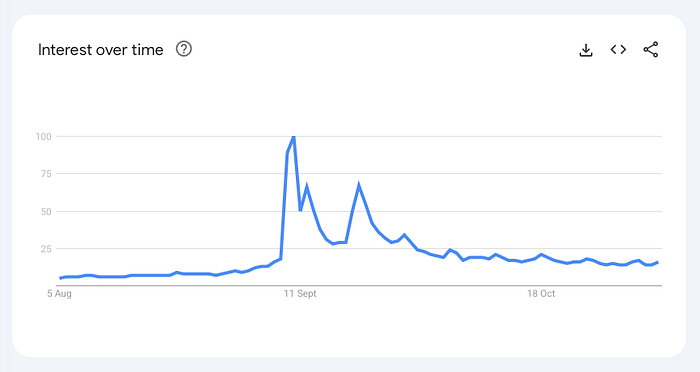
Example:
If your story is about Apple Notes, try searches like “Apple Notes tips,” “organize notes iPhone,” or “how to use Apple Notes for work.”
Pick one clear phrase and build around it.
2. Write for Readers First (and Google)
Why it matters: Google rewards content that’s clear, useful, and original.
You don’t need to stuff keywords — just make it obvious what the story delivers.
Focus on being helpful and easy to read.
Do this:
Title: Use a phrase people would actually search for.
Example: 10 Apple Notes Tips Every iPhone User Should KnowIntro: Explain the value quickly. Don’t just repeat the title — show why it matters.
Example: Apple Notes can be more than a digital notebook — it can run your whole day if you set it up right.Headlines: Break content into sections that echo your main topic.
Example: How to create quick-capture notes” or “Organize by tags, not folders.Paragraphs: Keep them short and focused (2–4 lines). Google and readers both like structure.
3. Add Internal and External Links
Why it matters: Links help Google understand your content’s context — and they keep readers exploring.
Internal links: Point to your own Substack stories.
Example: If you liked this, read my guide to Apple Reminders.
External links: Add references to trusted sources (official pages, research, or tools).
This builds authority — a ranking factor Google values.
4. Optimize Images and Alt Text
Why it matters: Google can’t “see” images — it reads the text you attach. Alt text tells search engines what’s inside the image.
Add descriptive alt text to every image.
Example: Screenshot of iPhone Notes app showing color-coded folders.

That’s how your images can appear in Google Image search — and improve accessibility too.
5. Edit SEO Title and Description
Why it matters: These two lines are what people see on Google before they click. A clear title and description improve your click-through rate (CTR).
Before publishing, open Settings → SEO Options.
SEO Title: A short, keyword-focused version of your title (under 60 characters).
Example: Best Apple Notes Tips for Productivity.SEO Description: One sentence (around 150 characters) summarizing the story.
Example: Learn how to organize and tag your Apple Notes for a cleaner digital setup.
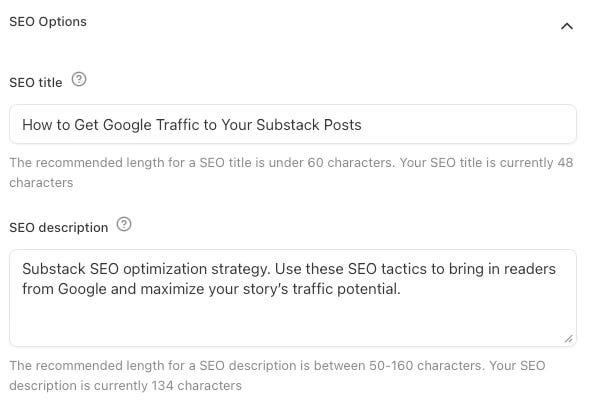
These appear on Google search results — not on Substack itself.
6. Customize Your Story Link (URL Slug)
Why it matters: URLs tell Google what the page is about. A clean, keyword-based slug looks more professional and helps SEO.*
Under Settings → SEO Options → Post URL, use a clean, keyword-based link.
Example:
Instead of
robinsanah.substack.com/how-i-use-apple-notes-for-everything-2025-1f894a65use
robinsanah.substack.com/apple-notes-tips
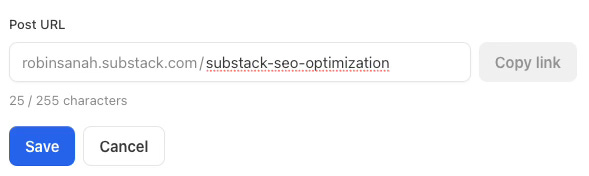
Short, readable links look better in search and increase clicks.
7. Use Tags
Why it matters: On Substack, you can use two types of tags: official categories and your own custom tags.
Official categories (like Technology, Business, or Literature) help your posts appear on Substack’s category pages and let your publication rank on leaderboards — though only your first chosen category counts for rankings.
Your own tags don’t affect discovery outside your site but create separate tag pages (like /t/books) that help organize content and make internal linking easier.
The best strategy is to combine both: official tags for visibility and custom tags for structure.

If you want to learn more about Substack tags you can read this article by Linda Caroll
8. Add Links and Update Regularly
Why it matters: Fresh, connected content tells Google your work is active and relevant — which helps rankings over time.
After publishing:
Share your story on social media or in your newsletter
Update older stories with new information — Google loves “fresh” content.
Use Substack stats to see if Google or other platforms are sending readers.
9. Be careful with Cross-Posting
Why it matters: Duplicate content can confuse Google — and split your traffic.*
If your story was first published on another platform (like Medium), you can Use Attribution and add something like this near the top or bottom:
Originally published on Medium (add a link)
That tells Google which version to rank.
Google doesn’t treat this like a canonical tag — but it does use surrounding text and links to understand content origin when duplicate pages exist.
If two versions of the same article exist and one clearly points to the other as the original, that often helps Google rank the intended one higher.
10. Final Touches That Boost SEO
Why it matters: These small details improve discoverability, readability, and engagement — all ranking signals.
Use strong cover images (they show in Google and on social media previews).
Take care of engagement — comments, likes, and restacks help Substack recommend your story.
Write naturally. One useful sentence beats five keyword-stuffed ones.
Quick Recap
If you remember one thing: Good SEO isn’t about tricks.
It’s about writing clearly, choosing the right keywords, and giving readers what they searched for.
Quick Checklist:
Find real search terms
Use them naturally in title + intro
Add internal/external links
Write alt text for images
Set SEO title & description
Simplify your URL
Use tags
Refresh and share regularly
Do that — and your Substack stories will work 24/7, bringing new readers straight from Google.
Thanks for reading!
-Robin
Thank you for posting this.
I’m familiar with most of the points, but one area where I relied on common sense was tags. I created my own tags, but I wasn’t aware of the Substack categories trick.
By the way, the link you provided for Linda’s article points to her profile. I found the article you’re referring to https://substack.com/@lindacaroll/p-157915222
Wow, the part about keyword research really stood out, becuase your explanation that basic optimization helps ideas reach more readers without changing writing style is incredibly insightful and practical.